Create a Walkthrough Video with One Click
You do not need 3D animation, a powerful workstation, or video editing. Generate a short architectural film ready to show a client.
- Jowita Chmura
- Rendering AI , Architectural video
How It Works
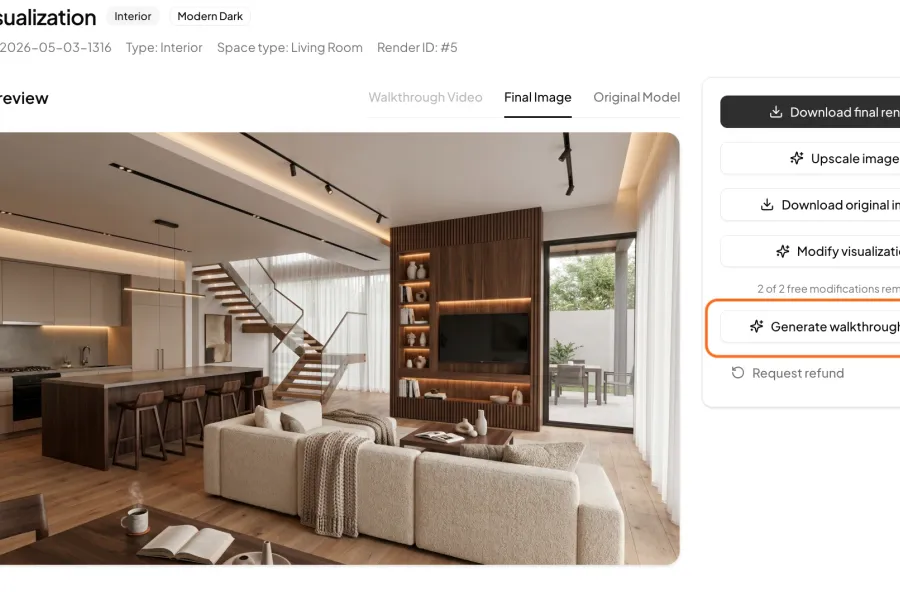
Step 1
Cinematic Walkthrough with One Click
Already have a finished visualization? Click Generate walkthrough video, and QuickArchViz automatically creates a smooth 8-second walkthrough of your project.
The video is generated in a separate tab and is usually ready in 2-3 minutes.
- No camera animation.
- No keyframes.
- No extra software.
- Professional presentation effect.
- Ready for social media, architecture portfolios, and client meetings.
A static render shows the project. Video helps the client feel it.
Clients increasingly expect more than a single still render. A short cinematic walkthrough helps them understand space, atmosphere, and project character before construction begins.
Traditional architectural animation is time-consuming, expensive, and requires a complex 3D workflow. QuickArchViz removes that friction.
After generating a visualization, you can create a professional presentation video with one click, without animating cameras, setting motion paths, or rendering hundreds of frames.
FAQ
How long does video generation take?
Most walkthroughs generate in about 2-3 minutes, depending on system load.
How long is the video?
QuickArchViz typically generates an 8-second cinematic walkthrough.
Do I need to set camera movement?
No. The camera movement is generated automatically by AI.
Does the video preserve the architecture?
Yes. QuickArchViz is designed to preserve geometry, proportions, perspective, and architectural character.
Can I use the video on social media?
Yes. Walkthroughs work well on Instagram, LinkedIn, TikTok, and in client presentations.
Do I need video editing software?
No. You receive a finished film exported directly from the app.
Create architectural walkthroughs without animation or rendering.
Turn a single visualization into a cinematic video that helps sell the project faster and creates a wow moment in client meetings.
Generate your first video for free