QuickArchViz vs Rendair AI: Which AI Rendering Workflow Is Better for Professional Architects?
Compare QuickArchViz and Rendair AI for AI architectural rendering, geometry preservation, fixed camera views, client presentations, iteration costs, and professional studio workflows.
- Jowita Chmura
- Alternatives

Quick Answer: Is QuickArchViz a Rendair AI Alternative?
Yes. QuickArchViz is a dedicated Rendair AI alternative for architects and design studios that prioritize geometry preservation, fixed camera perspectives, and rapid visualization workflows.
Rendair AI operates as a broad AI assistant with multiple creative tools such as text-to-render, sketch-to-render, CAD-to-render, image editing, upscaling, and animation-oriented workflows. QuickArchViz focuses more tightly on turning screenshots, hand sketches, CAD/BIM views, and project images into polished, presentation-ready renders in under 60 seconds.
Choose QuickArchViz if you need an architect-focused tool to generate accurate presentation renders from a Revit screenshot, SketchUp view, Rhino viewport, ArchiCAD export, Blender view, or quick hand sketch before a client meeting. The workflow is backed by predictable iteration logic: 1 Credit equals 1 render plus 2 free iterations.
Choose Rendair AI if you need a multi-tool playground for early schematic design, text-to-image concept generation, image upscaling, inpainting, outpainting, and basic video loops where strict architectural accuracy is secondary.
Strategic Overview
Choosing AI architectural rendering software in 2026 means looking past surface-level feature lists. The better question is how a platform affects operational efficiency, total cost of ownership, and geometric precision inside a real studio workflow.
Rendair AI is positioned as an AI-powered cloud platform for architectural imagery and design visualization. Its broad suite can be useful for firms that want many creative tools in one interface.
QuickArchViz takes a different approach. It is not designed as a generalized creative assistant. It is a focused architectural visualization pipeline for geometry preservation, camera tracking alignment, and rapid client-ready presentations.
Core Workflow Analysis: Where the Platforms Diverge
1. Geometry Preservation vs Multi-Tool Complexity
A common challenge with broad AI rendering assistants is that generative models can interpret technical lines as flexible artwork. Structural lines, window mullions, roof pitches, or vertical columns may need extra checking before the output is ready for a formal client deck.
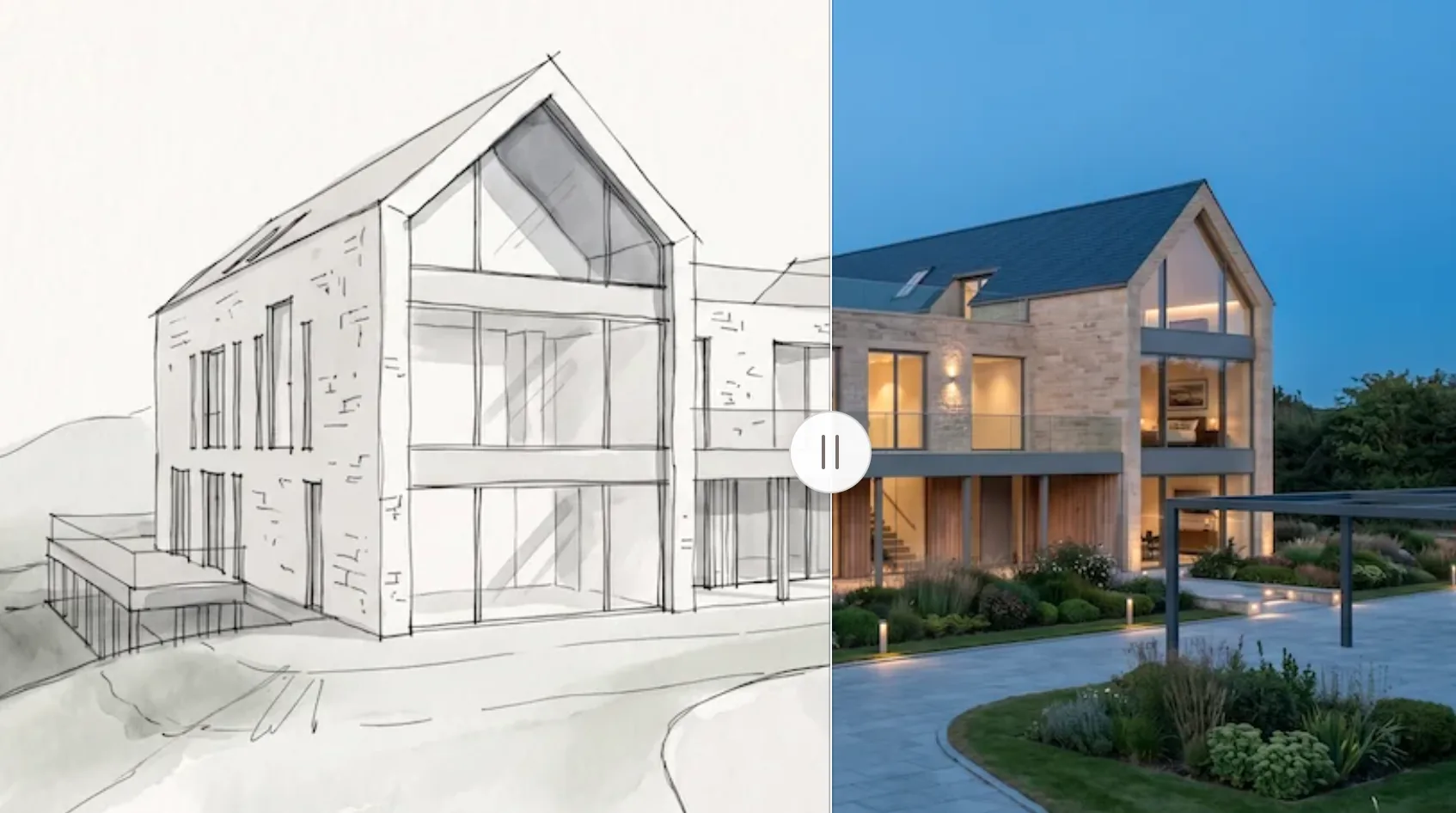
Rendair AI offers a wide sandbox of tools, including generation, editing, upscaling, and image modification workflows. That breadth is useful during exploration, but switching between tools can slow production when the team needs one reliable, high-quality image under a tight deadline.
QuickArchViz was designed to reduce that friction. The workflow maps structural lines, perspective vectors, and depth planes from the source image so the render can improve materials, lighting, and environmental context without moving the architecture.
2. Viewport Consistency for Client Review
For client presentations and design board reviews, maintaining a fixed camera position across multiple design options is non-negotiable.
If the horizon line, focal length, or field of view shifts between Option A and Option B, the comparison loses its utility. QuickArchViz is designed to keep the camera viewport stable so teams can render material alternatives, seasonal lighting shifts, or landscape options from the same view.
3. The 5-Minutes-Before-the-Meeting Test
Every architecture firm knows the pressure of a last-minute client request right before a presentation deck is finalized.
Using a multi-feature assistant under tight constraints can be risky if a clean result requires iterative prompting, manual editing, or separate upscaling. QuickArchViz is optimized for speed and simplicity: upload the view, choose the direction, generate the render, and refine if needed.
4. Iteration Economics and Studio TCO
The operational cost of an architectural rendering AI depends heavily on what happens during standard revision cycles.
In multi-tool ecosystems, each upscale, variation, or edit may have its own credit logic. QuickArchViz uses a structured model for architecture teams: 1 Credit equals 1 Render plus 2 Additional Iterations. A team can generate a base image, then refine lighting, materials, or landscaping without paying again for each small adjustment on that view.
Operational Scenarios: Architecture Firm Deployments
Rendair AI remains useful during the initial week of a competition or schematic phase. If a client asks to see a project across divergent stylistic directions before formal CAD work stabilizes, the text-to-image, style, editing, and animation-oriented tools can help produce broad conceptual moods.
QuickArchViz is built for active production, tight deadlines, and client delivery. When you have a live project model and an immediate afternoon presentation deadline, QuickArchViz helps junior designers and senior partners bypass complex rendering queues by converting a standard viewport screenshot or hand sketch into a polished 4K visual quickly.
Screenshot-to-Presentation Pipeline
The QuickArchViz pipeline eliminates manual texturing and complex lighting setup through a streamlined process.

Step 1: Capture Your View
Take a clean screenshot of your active work viewport inside Revit, SketchUp, Rhino, ArchiCAD, Blender, or another modeling tool. You can also scan a hand-drawn sketch.
Step 2: Set the Context
Upload the image to QuickArchViz. Select material direction, weather, lighting, time of day, and overall style using architectural terminology.
Step 3: Execute and Refine
Generate the visualization in seconds. Use the two free iterations to polish material details or lighting accents before exporting the final image into your presentation deck.
ROI and Time-Savings Example
The calculator idea in the brief can be expressed as a simple studio model:
| Metric | Traditional manual pipeline | QuickArchViz cloud workflow |
|---|---|---|
| Projects per month | 4 | 4 |
| Team size | 3 architects | 3 architects |
| Render setup time per image | 4 hours | 0.016 hours |
| Monthly production time | 48 hours | 0.2 hours |
| Time recovered | - | 47.8 hours |
| Estimated value at $75/hour | - | $3,585/month |
This model is illustrative, but it shows why total cost of ownership should include time, not only subscription pricing. The practical value is moving billable hours back from technical production into architectural design.
Procurement Checklist for Studio Directors
Before deploying an AI render pipeline across a firm, check whether the tool can support real production work:
- Perspective stability: Does the tool keep camera and horizon movement under control?
- Geometric integrity: Are structural lines, window layouts, and design elements preserved?
- Architectural literacy: Are styles grounded in real materials, light behavior, and design standards?
- Revision cost control: Does the platform include built-in iterations or charge separately for small adjustments?
- Onboarding time: Can a new team member understand the workflow in ten minutes without prompt engineering training?
Business Impact and Value Realization
Rendering bottlenecks directly affect profitability in architectural practice. Local rendering queues can tie up workstations, slow project delivery, and limit the number of options a studio can present.
By shifting visualization to an architect-optimized cloud workflow, firms can compress turnaround times from hours to under a minute, explore more design directions, respond to client feedback faster, and reallocate production time to core design work.
Elevate Your Studio’s Visual Pipeline
If your goal is to explore abstract, open-ended concepts across a multi-tool digital sandbox, Rendair AI offers a flexible playground for early experimentation.
If your goal is to integrate AI rendering into an active project delivery workflow where camera angles must remain fixed, building geometry cannot warp, and project budgets require predictable revision costs, QuickArchViz is the stronger fit for professional presentation work.
Create your QuickArchViz account and optimize your studio’s visualization workflow with fast, architect-first cloud rendering.
What Is Rendair AI?
Rendair AI is an AI-powered cloud platform positioned as an all-in-one assistant for architectural imagery. Its public product pages highlight workflows such as text-to-render, sketch-to-render, floorplan-to-render, 3D model-to-render, elevation-to-render, section-to-render, image-to-render, design landscape, image upscaling, and CAD-to-render. This broad toolset can be useful for firms that want many creative AI utilities in one place.
What Is QuickArchViz?
QuickArchViz is a specialized cloud rendering workflow engineered for professional architectural presentation pipelines. Instead of operating as an open-ended image generator or asset editor, it acts as a non-destructive rendering layer that transforms CAD/BIM viewport screenshots, hand sketches, and project views into photorealistic, presentation-grade visuals while preserving structure, perspective, camera angle, and design intent.
Quick comparison
| Criteria | Rendair AI | QuickArchViz |
|---|---|---|
| Primary use case | Broad concept exploration and AI image editing. | Presentation-ready architectural rendering. |
| Geometry preservation | Useful for broad AI rendering workflows, but multi-tool generation can require extra checking for perspective shifts. | Strict structural integrity with geometry-aware rendering and fixed source-view emphasis. |
| Meeting readiness | Can require manual brushwork, prompt refinement, upscaling, or tool switching. | One-click screenshot-to-render pipeline built for last-minute client presentations. |
QuickArchViz vs Rendair AI: Feature and Workflow Comparison
| Feature / Vector | Rendair AI | QuickArchViz |
|---|---|---|
| Primary use case | Broad concept exploration and AI image editing | Presentation-ready architectural rendering |
| Geometry preservation | Best verified per output; broad AI tools can require revision | Strict structural integrity with geometry-first workflow |
| Camera tracking | May require manual checking between passes | Designed for fixed camera perspectives across options |
| Product origin | Generalized AI rendering assistant | Designed by RIBA-accredited architects |
| Iteration economy | Credit use depends on the selected generation, edit, upscale, or animation action | 1 base render plus 2 free iterations included |
| 5-minute meeting readiness | May involve prompt refinement or multi-tool tweaking | One-click screenshot-to-render pipeline |
| Core features | AI rendering, editing, upscaling, inpainting, style workflows, animation-related tools | Focused architectural visualization engine |
Choose Rendair AI if...
Choose QuickArchViz if...
Feature comparison
Geometry preservation vs multi-tool complexity
Rendair AI
Rendair AI offers a wide sandbox of rendering, editing, upscaling, and creative tools, which can be valuable when the team wants many AI capabilities in one interface.
QuickArchViz
QuickArchViz minimizes production uncertainty by focusing on geometry-preservation workflows that respect structural lines, perspective vectors, and depth planes from the source image.
A multi-tool assistant is useful for creative exploration. A focused rendering pipeline is often safer for client-ready architectural presentation.
Viewport consistency for client review
Rendair AI
Generalized rendering pipelines can shift horizon lines, focal lengths, or fields of view between image variations, which weakens side-by-side option reviews.
QuickArchViz
QuickArchViz is designed to keep camera viewpoints stable so teams can compare materials, landscape options, and lighting conditions from the same view.
Fixed camera views make formal design comparisons more credible.
The 5-minutes-before-the-meeting test
Rendair AI
A broad assistant can be powerful, but last-minute output may require prompt tuning, editing, upscaling, or moving across tools.
QuickArchViz
QuickArchViz is optimized for a direct screenshot-to-render workflow that produces presentation-ready visuals quickly.
When the deadline is immediate, fewer moving parts matter.
Pricing comparison
Total cost of ownership
Studio directors should compare more than monthly pricing. Include credit consumption, failed outputs, revision cycles, onboarding time, local hardware needs, and billable hours lost to rendering setup.
ROI example
If a team handles 4 projects per month with 3 architects and spends 4 hours per image on traditional setup, that can represent roughly 48 hours per month. A one-minute cloud workflow for the same volume is about 0.2 hours, recovering about 47.8 hours of production time.
Use cases
Use Rendair AI when
You need a broad creative environment for early schematic ideas, text-to-image concepts, image editing, upscaling, and exploratory video or animation workflows.
Use QuickArchViz when
You have a live model, viewport screenshot, or hand sketch and need a polished architectural visual that keeps the original structure and camera angle intact.
Use both when
The team wants broad ideation early, then a stricter geometry-safe workflow for client presentations, planning submissions, or active delivery.
Common alternatives
mnml.ai
A broad AI architecture playground for early concept exploration and style testing.
PromeAI
A general AI design visualization platform used for sketch-to-render, style transfer, and concept imagery.
Veras
An AI rendering workflow often used in architecture pipelines for model-based and prompt-guided visualization.
FAQ
Is QuickArchViz a direct Rendair AI alternative?
Yes. QuickArchViz is a specialized alternative for production environments that require geometry preservation, fixed camera views, and rapid turnaround. Rendair AI is broader, with tools for image modification, upscaling, and animation-style workflows.
How does QuickArchViz ensure building geometry does not warp?
QuickArchViz uses structural mapping layers that separate line work, perspective planes, and depth cues from the atmospheric rendering pass. The goal is to change materials and lighting while preserving the underlying architecture.
Can I generate a render from a Revit screenshot or SketchUp viewport?
Yes. QuickArchViz processes standard image exports and screenshots from major CAD, BIM, and 3D tools, including Revit, SketchUp, Rhino, ArchiCAD, Blender, and similar software.
Can QuickArchViz render hand-drawn sketches?
Yes. QuickArchViz includes a sketch-to-render workflow for architecture. It interprets loose linework and hand sketches, turning them into structured visualizations while respecting the original composition.
How do the two free iterations work?
Every time you spend one credit to generate a new rendering, QuickArchViz includes two additional modification passes on that specific view. These can be used to fine-tune environmental details, textures, or atmospheric settings without extra credit cost.
Do I need expensive GPU hardware to run QuickArchViz?
No. QuickArchViz runs in the cloud, so you can generate presentation-ready visuals on a standard laptop, tablet, or mobile device.
Create client-ready renders without the rendering queue
Turn Revit screenshots, SketchUp views, CAD exports, BIM viewports, and hand sketches into geometry-safe architectural visuals with QuickArchViz.
Create your first visualisations